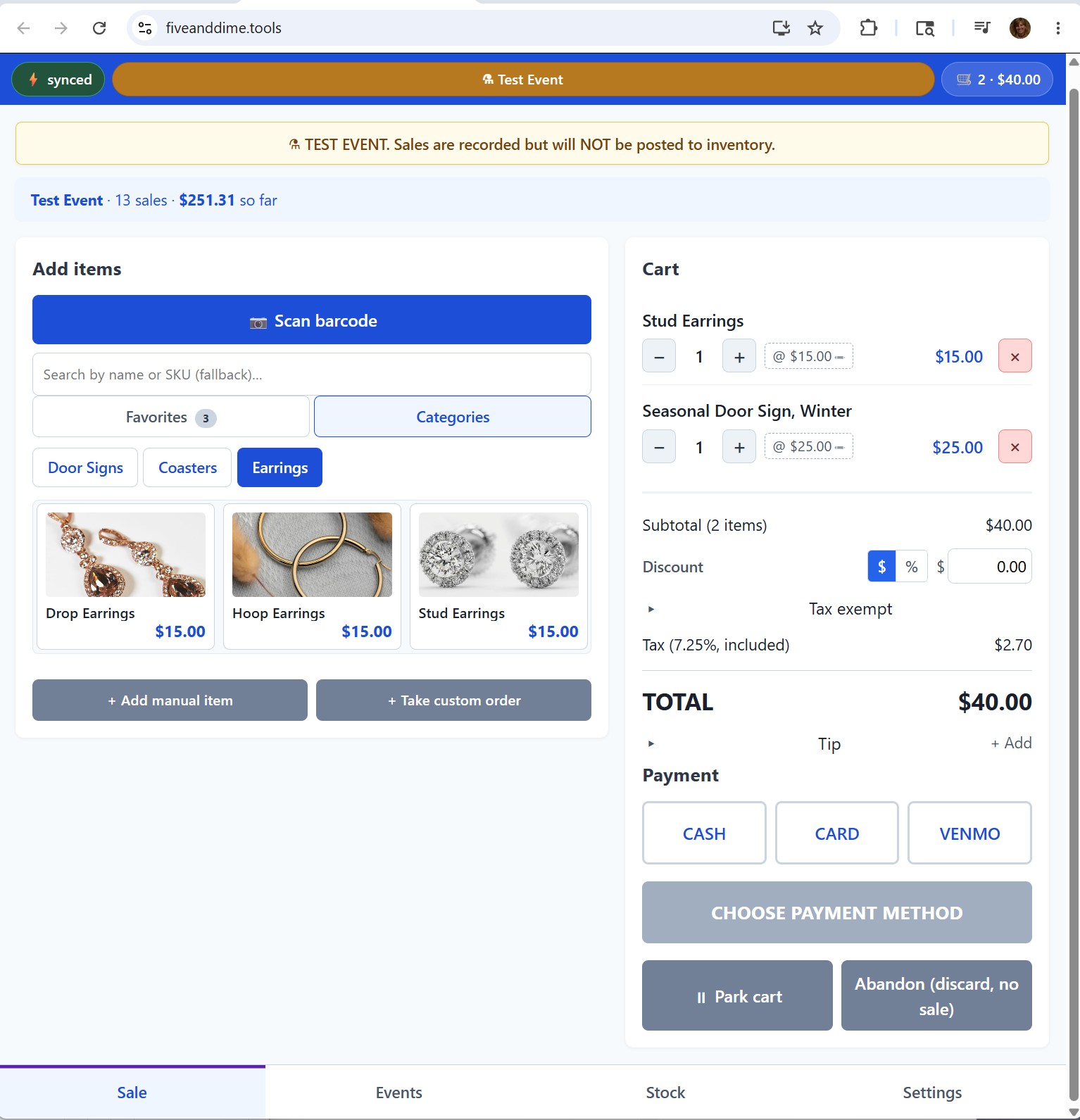
Ring up a sale and fiveanddime records it, takes it off your inventory, and adds it to that show's profit. It records cash, Venmo, and card sales, and if you use Square, it can hand the total to your Square app. Two people can sell at once from their own phones. Your data lives in your own Google Sheet. One-time price, no subscription.
The features that the booth-life crowd cares about that the subscription-app shape doesn't quite hit.
Booth-side it feels like a real POS: fast, parked carts, works through bad cell signal, scan items in with the device camera (and print your own barcode sheets from the catalog). All the data underneath lives in a Google Sheet you own. Add a column, drop in a formula, walk away whenever.
Three things craft vendors keep asking other POS tools for. Sheet-driven bundles ("4 coasters for $25") that auto-apply at checkout. Custom orders with partial-payment deposits: take a down payment, finish the piece, settle the balance later (with tax computed on just what they owe). Reports that aggregate by event, not just by date.
Pay once, with lifetime updates. The features other retail POS tools paywall (cost tracking, low-stock alerts, advanced inventory reports) ship in your license. Keep taking payments the way you do now (cash, Venmo, your own card processor) and record each sale by how it was paid. fiveanddime doesn't process payments, so your money goes straight to you and we never take a cut.
No staged mockups, this is the real app running on a phone. It's recorded in Test Event mode (that orange banner up top), which lets you practice without touching your real inventory or reports.
Tap items into the cart, apply a discount, take payment. Plays on a loop, no sound.
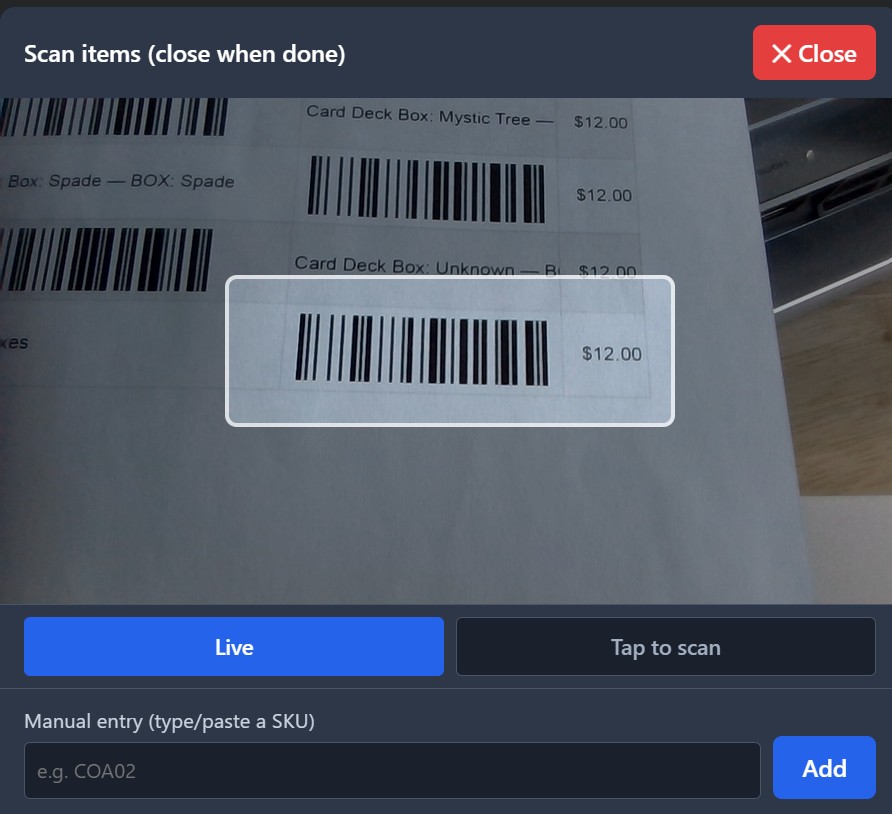
Point the device camera at a barcode and the item drops into the cart. Print your own Code 128 label sheets straight from your catalog, so everything you sell has a tag that scans.
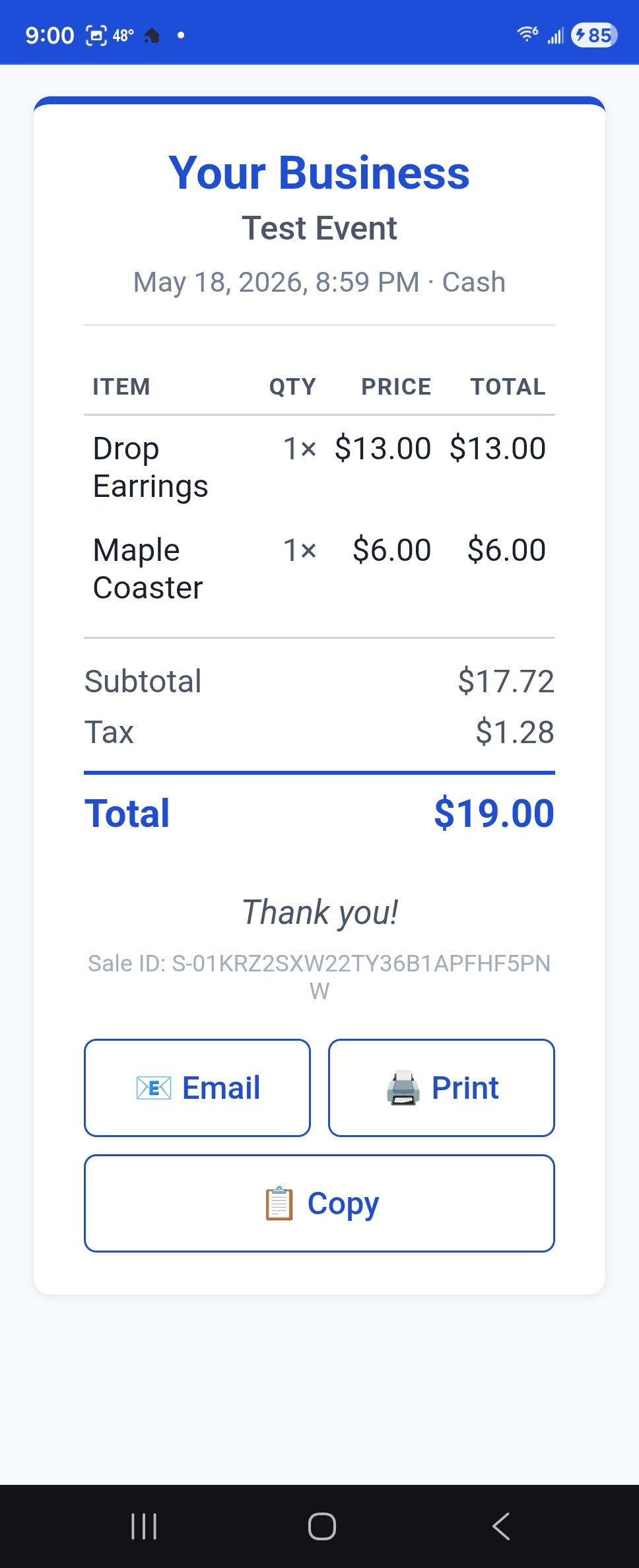
At checkout the customer scans a QR code and the receipt opens on their phone. They email, print, or copy it themselves. Nothing to key in, no paper roll to feed.
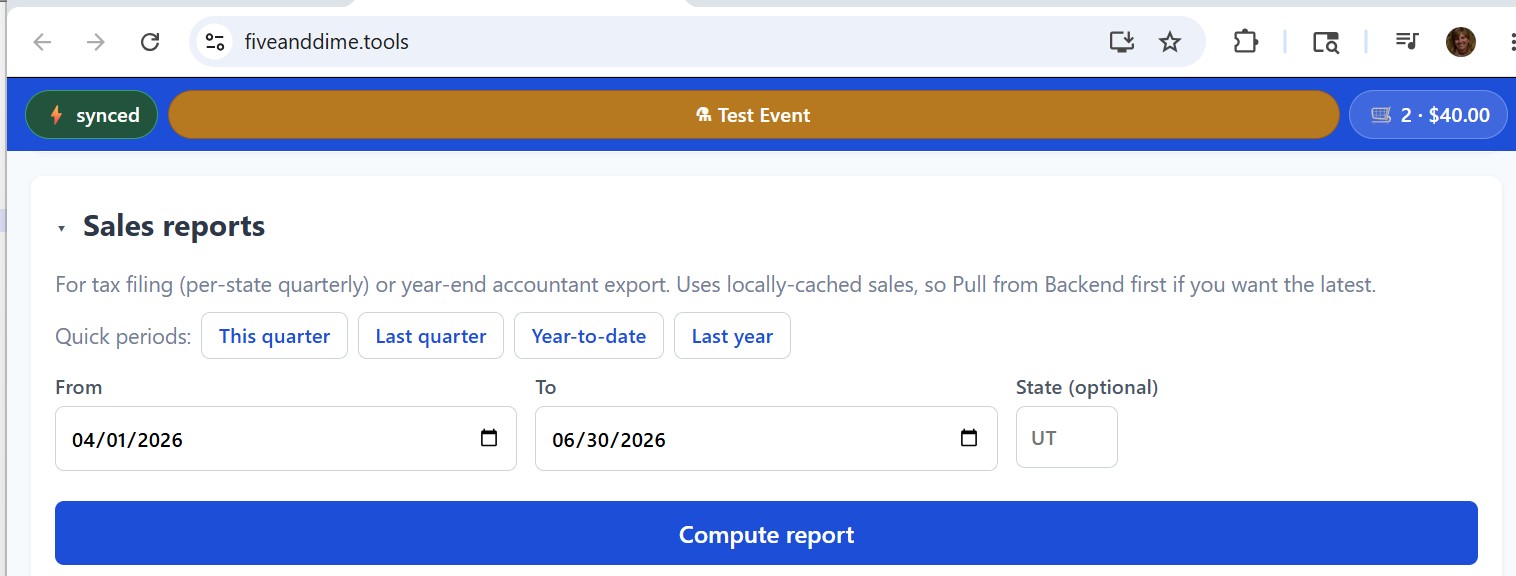
Per-state quarterly totals for sales-tax filing and a clean year-end export for your accountant, computed from sales data that lives in a Google Sheet you own.
Most POS apps want a constant data connection, a monthly fee, and your sales numbers in their database. Most of you are working a folding table at a fairground, processing payments through whatever you already use, and would prefer your books in a spreadsheet you can read. fiveanddime is built around that reality.
Everything below is shipped and in use, no roadmap promises. Tap a heading to open or close a group.
Auto-applied bundle pricing ("4 coasters for $25") defined in your Bundles sheet. No need to remember what's on special.
Tap a line and adjust the price for haggling. Receipts show "(was $X)" so the customer sees the break.
Cart-level tip with quick-add buttons. Per-cart tax-exempt toggle for resale-cert buyers and nonprofit purchases.
Customer steps away to grab a friend? Park the cart, ring up the next person, resume the parked one when they return.
Customer scans a QR at checkout, gets the receipt on their phone: email, print, or screenshot. No paper, no email entry.
Tap Charge card and the cart total hands off to the Square app, pre-filled. The customer taps their card and the sale records itself with the Square transaction ID. No re-keying, no app-switching math. Your money lands in your own Square account.
Husband on a second tablet at the same booth works fine. Sales tag with the device that rang them up.
Print labels from your product list, scan items into the cart with the device camera. Manual SKU search and tap-to-add work the same. Scanning speeds up a busy line, but it's optional, never required.
Generate Code 128 label sheets from your product catalog: Avery 5160 / 5167 layouts, master sheet, or category-grouped. PDF export, ready for your label printer.
Sales accumulate during the event; tap "post" once at the end to decrement quantities. Test events refuse posting so practice runs don't move stock.
Damaged, lost, sample, giveaway, personal use, display piece, count discrepancy, found. Audit trail in Inventory_Transactions.
Physical count says 12, system says 14. Adjust −2 with reason "count discrepancy" in three taps.
Read-only inventory view sorted low-stock-first. "Do I have any of those left?" Answer in two taps without opening Sheets.
Booth fee + mileage + sales − cost = profit per event. Stop guessing which fairs are worth it.
Quarterly filing your sales tax? Pick the state and date range, get the report. CSV export for year-end and audits.
When does the booth get busy? See gross by hour-of-day and plan your demos and rest breaks accordingly.
By SKU, by category, by event. Per-state filtering. Profit columns appear automatically once you've filled in product cost.
Sticker prices can be the customer-pays total (tax back-computed) or pre-tax with tax added at checkout. Per-vendor setting.
Some venues take a cut. Mark the event as commission-tier; the POS pulls each product's higher consignment price automatically.
Add, edit, soft-delete products without touching the spreadsheet. Direct sheet edits still work for power users.
Set up a new event the night before: name, dates, location, tax rate, booth fee, mileage, commission tier. All from your phone.
Every column has a definition in a Help tab inside your spreadsheet. No need to read code or come back to me.
Generate a product-request signup QR and mailing-list QR for booth display. Responses land in Google Forms you control.
Every night, a fresh copy of your spreadsheet lands in a Backups folder in your own Drive. Configurable retention; manual "Backup now" button too.
Built into Google Sheets. You keep every change forever. Undo a row delete from a week ago in two clicks.
Every sale carries a client-generated ID. A flaky network won't double-post. Voids refuse if a sale's already been posted to inventory.
Discontinued products are flagged not deleted, so your sales history stays intact. Inventory adjustments record the reason and which device made them.
I built fiveanddime because I needed it. I sell laser-cut wood pieces at craft fairs in Utah (you can find me at woodendoodle.com) and at the booth itself, most weekends. Every feature here got tested in the field before it shipped. Things break and get fixed because they broke on me.
Maker tools, sister product. If you're a laser-cutter person, you might also like sparq.tools. Same authorial voice, different problem space.
fiveanddime is for the bookkeeping & selling side. sparq.tools is for the making side.
After a craft show, my friend and I used to ask each other "what did we sell?" We didn't write things down, so trying to remember what we needed to replace for the next show was just a guessing game. Then we had to go through our Square sales, Venmo and cash to total up what we had taken in for that show. With fiveanddime there are no more guessing games, we can track our inventory, our income is in one place and we know what our profit is. I have the app on my iPhone and my laptop, they sync up with each other. If you are just starting out or have been selling for a while, this app will definitely make it easier for you.
Oh my goodness, the fiveanddime app is a craft and small-business vendor's dream! It took me a little bit to get used to because it is so robust. I uploaded my products with photos, synced to the app, and voila, it's ready to go! My products are categorized and easy to find when I'm completing a sale. If I forgot to add something, I can add it manually on the fly. I can track my sales during an event, look back at previous events, and check stock. At the market's end, I can sync again to update my inventory. Jan, a vendor herself, has thought of everything. I can't wait to use it again at my next market!
Yes. Designed for it. Sales record on the device and queue locally. When you're back online (cell signal in the parking lot, hotel Wi-Fi, etc.) the queue drains automatically. License caches for up to seven days so a brief licensing-service outage doesn't stop you from selling.
Craft fair vendors, market sellers, and makers who sell at pop-ups and festivals. It was built by a working Utah maker and tested at real craft fairs, so it follows how a booth actually runs: a folding table, spotty signal, sometimes two people selling at once.
Ring up every sale in fiveanddime and tap how the customer paid. The event report totals each payment type and the sales tax, so cash, Venmo, and card sales all land in one place instead of three.
When you set up an event, enter the booth fee, mileage, and any commission. Give your products a cost. The event report then takes those out of your sales and shows what you actually made at that show, along with what sold by category.
No. fiveanddime is $89 once, with lifetime updates. If you take cards through Square or another processor, that processor charges its own fees as usual; fiveanddime adds nothing.
No. It runs in the web browser on the phone, tablet, or laptop you already have. The device camera scans barcodes, and you can print your own labels on standard Avery 5167 sheets. If you take cards, you use your card processor's own reader.
However you take payments now: cash, Venmo, or your own card processor. fiveanddime does not process payments; it records each sale and how it was paid. If you use Square, tap Charge card and fiveanddime hands the total to the Square app with the amount pre-filled, then records the sale with the Square transaction ID when the customer pays. Your money lands in your own account, and fiveanddime never adds a fee.
Yes. Same license, same backend, sales tag with which device rang them up so you can tell who sold what. Two phones / a phone and a tablet / a husband-and-wife setup all work fine.
Sales queue locally. The license is cached for seven days. The PWA shell is cached so even cold-starting the app works. Sync resumes when connectivity returns.
Yes. Scan items into the cart with the device camera (Code 128 supported, plus standard retail formats on browsers that support the underlying API; iOS Safari and Android Chrome are the strongest). You can also generate printable Code 128 label sheets from your product catalog (Avery 5160 / 5167 layouts and master sheets included). Manual SKU search works on every device. Scanning speeds you up when the line is long, but it's never required.
Three ways, depending on the situation: end-of-event posting decrements quantities for everything sold (idempotent, safe to re-run); inventory adjustments with reason codes for off-cycle changes (damaged, sample given, etc.); cycle counts when the physical count and system count disagree.
Per-state quarterly remittance report shipped. Year-end CSV export shipped. Default is tax-included pricing (sticker is the customer-pays total); tax-on-top mode also supported per vendor.
Your sales, inventory, events all live in a Google Sheet in your Drive. The web app is a thin layer that reads/writes to it. The licensing service knows your email + license key + which Apps Script URL is yours. That's it. I don't see your sales numbers; I never have.
$89, one time. Lifetime updates, 30-day money-back guarantee, no subscription. Self-hosted on your own free Google services (Apps Script for the backend, your Drive for the data). About $0/month variable cost to run.
The spreadsheet is open: add columns, add formulas, add tabs. The backend is Apps Script you can read and modify. Custom needs that don't fit the wrapped UI can usually be solved by dropping a formula in the right cell.
They'd be writing to your spreadsheet (your Apps Script URL is what the license points at), so they're sharing your books. Self-defeating for them. Keys are revocable.
$89, paid once. One-time license, no subscription. Your data lives in your Google Drive. Lifetime updates. 30-day refund if it isn't a fit.
Buy fiveanddime · $89Payment is processed by Square. After checkout you'll receive an email with your license key and a 15-minute setup walkthrough. Plain-English license terms. Questions first? support@fiveanddime.tools.
Built by a working Utah maker and field-tested at real craft fairs.